
PatCheck Extension – Simplified Patent Legal Status at a Glance
The PatCheck Extension simplifies patent research by displaying the simplified legal status of patents based on INPADOC data directly in the results lists of major public patent databases.
The current protection status is visible at a glance—without the need to consult additional legal status sources.
The extension is available for free and can be installed via the Chrome Web Store or Edge Web Store.
Supported platforms: Espacenet, Google Patents, WIPO Patentscope, USPTO PPUBS
1. Color-coded display of patent protection status
Color-coded patent numbers in the results list provide an immediate visual indication of the current legal status:
- Red: Protection in force
- Orange: Application pending
- Green: No protection
- Violet: File inspection required
This color coding enables quick orientation and faster decision-making during patent research.
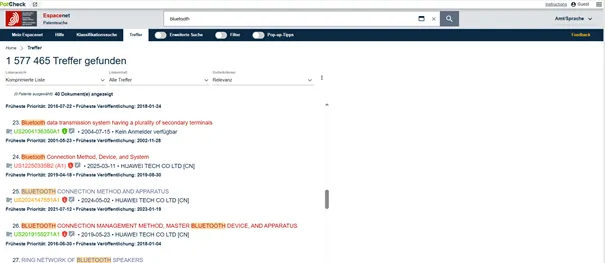
2. Overview of the global patent protection
Clicking the icon next to a patent number opens an overview showing the simplified legal status of all active patent family members, derived from INPADOC data.
The overview displays the countries in which the invention is filed or already granted, providing instant visibility of the international protection landscape.
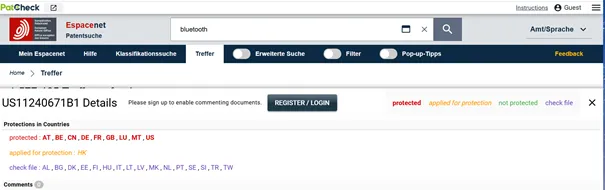
Espacenet patent detail view showing country-specific protection status with the PatCheck Extension enabled.
3. Saving patents to PatCheck during research
Patents can be saved directly from Espacenet, Google Patents, WIPO Patentscope, and USPTO PPUBS into PatCheck.
Relevant results from different patent offices are centrally consolidated, supporting structured and efficient patent analysis.
4. Monitoring patents
Patent monitoring can be activated directly in the results list.
- Automatic notifications are sent when the legal status of a monitored patent changes
- Newly published patents belonging to the same invention (new family members) are also reported
This significantly reduces the manual effort required to track changes in patent protection status.
5. Adding notes to individual patents
Notes can be created for each patent during research.
Notes are uniquely assigned to individual patent numbers while being automatically displayed across all documents within the same patent family, ensuring consistent documentation.
6. Extended CSV export in Espacenet
The Espacenet CSV export is extended to include the current simplified legal status based on INPADOC data.
This allows exported data to be processed, filtered, and analyzed more efficiently.
Summary
The PatCheck Extension enhances public patent platforms with a clear, INPADOC-based representation of simplified legal status—both for individual patents in results lists and across entire patent families.
Additional features such as patent saving, monitoring, note management, and extended CSV exports support the structured analysis and documentation of patent information.
Key Features at a Glance
- Legal Status Display: Simplified legal status based on INPADOC data
- Patent Family Overview: Visibility of legal status across related patents
- Notifications: Optional email alerts for legal status changes